Synchronous vs Asynchronous in JavaScript
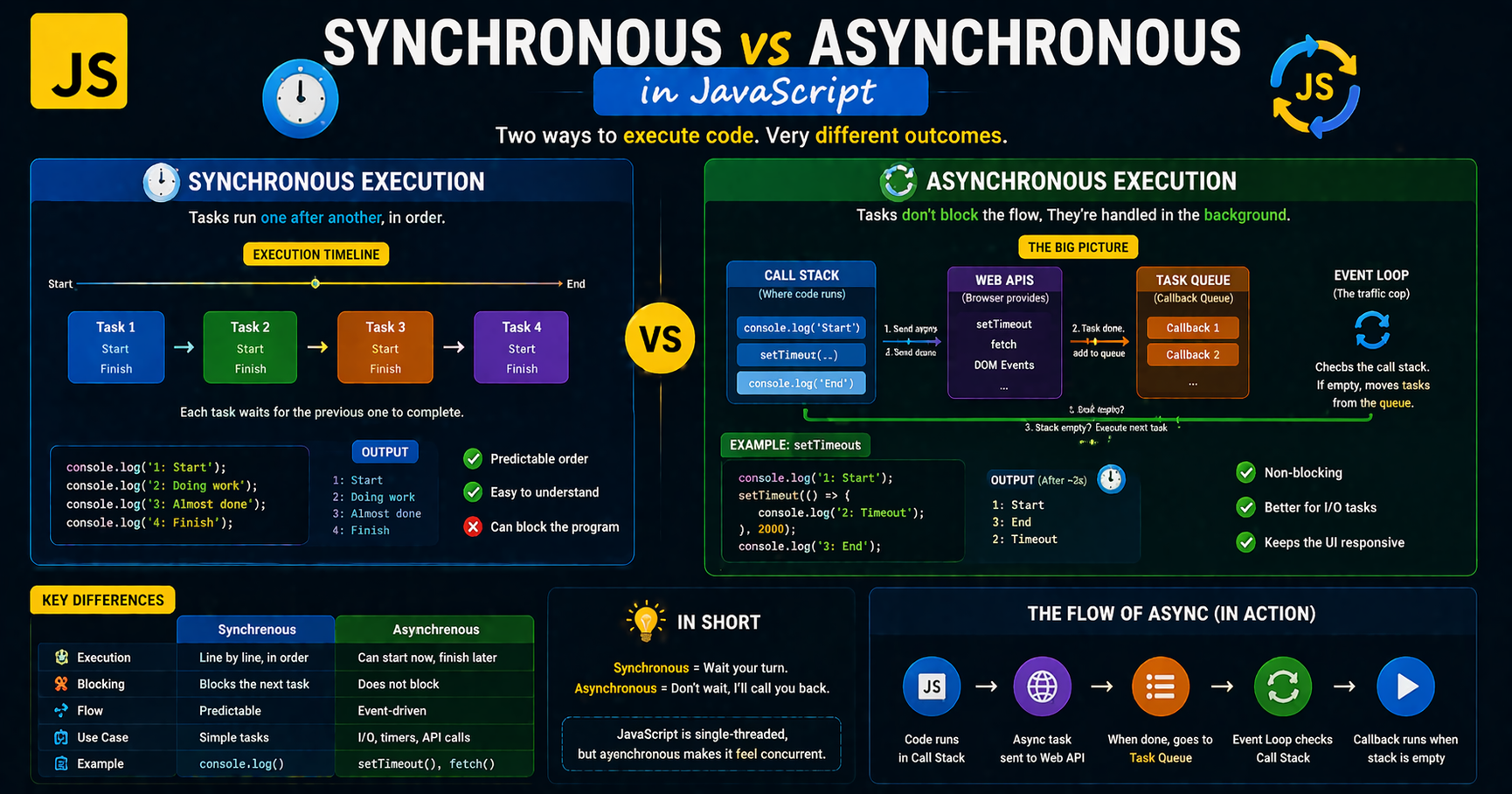
Introduction:
Imagine you’re at a restaurant:
Synchronous → You order food and stand at the counter doing nothing until it’s ready.
Asynchronous → You order food, get a token, and sit down. You do other things while waiting.
👉 JavaScript mostly behaves like the second one — it doesn’t like waiting idle.
📍 What’s in This Blog?
JavaScript looks simple on the surface, you write code line by line, and it runs. But the moment your application starts fetching data, handling user interactions, or waiting on timers, something interesting happens behind the scenes. Suddenly, execution is not just about what runs next, but what does not have to wait.
This is where the core idea of synchronous vs asynchronous behavior comes in.
At first glance, JavaScript appears strictly sequential, one task finishes, then the next begins. But if that were always true, modern web apps would feel painfully slow and unresponsive. Imagine clicking a button and the entire page freezing while it waits for data from a server. That is the limitation of purely synchronous execution.
To solve this, JavaScript uses an intelligent model that allows certain operations to run in the background while the main thread keeps moving. This balance between blocking and non blocking code is what makes real world applications fast, interactive, and scalable.
In this blog, we will break down these concepts in a simple, visual, and intuitive way, starting from basic step by step execution to understanding how JavaScript handles tasks like API calls and timers without freezing your app.
What Synchronous Code Means
Synchronous code executes line-by-line, where each operation must complete before the next one starts.
Single-threaded execution
Blocking behavior
Uses the call stack
Example:
console.log("Start");

console.log("Task 1");

console.log("Task 2");

console.log("End");
Output:
Start
Task 1
Task 2
End
Each line waits for the previous one to finish.
Synchronous Execution Timeline:
Time → [ Start ] → [ Task 1 ] → [ Task 2 ] → [ End ]
Problems that occur with blocking code
Blocking code stops everything. Because JavaScript is single threaded, it can only do one thing at a time. If you run a heavy task, the main thread becomes trapped, and nothing else, not even a button click, can happen until that task completes.
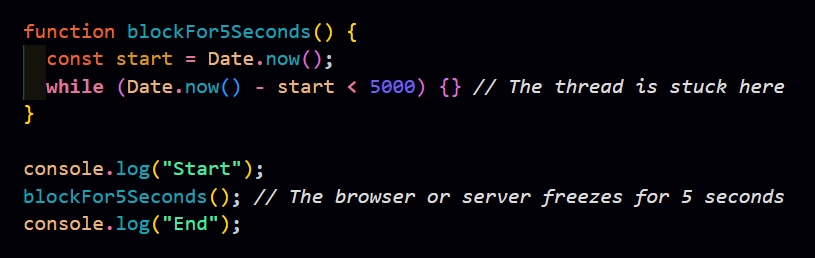
OUTPUT (DELAYED) :
Start
(5 seconds freeze 😴)
End
The Problems:
Frozen UI: The page becomes unresponsive. Users cannot scroll or click because the main thread is busy.
Request Bottlenecks: On a server, one user running this code stops all others. Everyone else waits in a virtual line until your process is finished.
Poor User Experience: Slow apps are usually caused by blocking code. Even a small block makes an interface feel sluggish.
What Asynchronous Code Means
Asynchronous code allows tasks to run independently, so the program doesn’t wait for slow operations.
Non-blocking behavior
Uses Event Loop, Callback Queue
Delegates tasks to Web APIs (browser / Node.js)
Example (Timer):
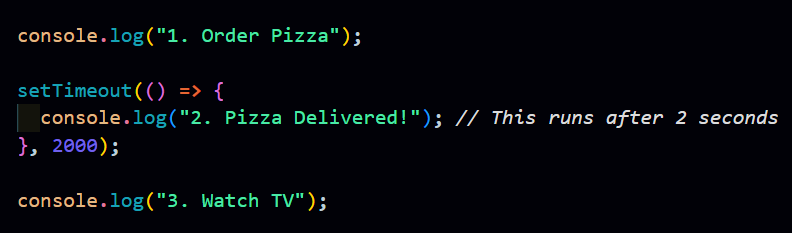
Output:
1. Order Pizza
3. Watch TV
2. Pizza Delivered!
The timer runs in the background while JS continues.
Asynchronous Execution Concept:
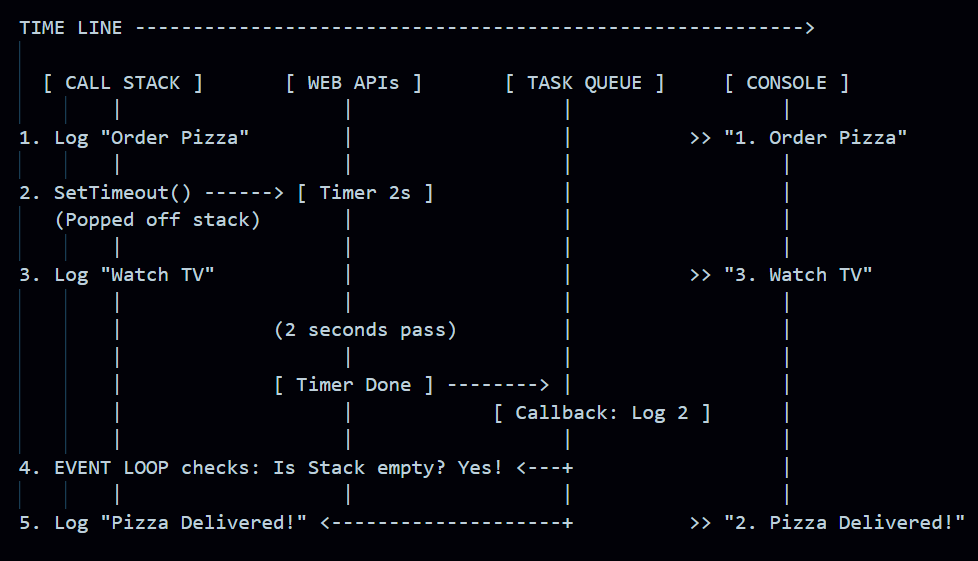
Step-by-Step Logic:
Step 1: The engine hits
console.log("1. Order Pizza")and prints it immediately.Step 2: It sees
setTimeout. It tells the browser, "Hey, start a timer for 2 seconds. I'm moving on!" ThesetTimeoutis removed from the stack.Step 3: It immediately runs
console.log("3. Watch TV"). It doesn't wait for the pizza.The Background: While you are "watching TV," the browser's Web API is counting down those 2 seconds.
The Handoff: Once the 2 seconds are up, the callback (the pizza delivery) is moved to the Task Queue.
The Event Loop: The Event Loop waits until the Call Stack is totally clear. Once it's quiet, it pushes the pizza delivery log onto the stack, and you see "2. Pizza Delivered!" last.
Why JavaScript Needs Asynchronous Behavior
JavaScript runs on a single thread (one task at a time).
If everything were synchronous:
The app would freeze while waiting
UI would become unresponsive
Poor user experience
JavaScript is primarily a language for the web. It needs to handle:
1. Network Requests (API Calls): Fetching data from a server.
Using the modern fetch API, we don't block the rest of the application while waiting for the server to respond.
async function fetchUserData(userId) {
  console.log("Fetching user...");
  // Execution pauses here until the data returns, but the main thread is free!
  const response = await fetch(`https://api.example.com/users/${userId}`);
  const data = await response.json();
  console.log("User data received:", data);
}

fetchUserData(1);
console.log("This logs immediately while waiting for the API.");
2.User Input (Event Listeners): Listening for clicks and scrolls.
Event listeners are the classic example of asynchronous behavior. You define the logic now, but it only runs when the user performs an action later.
const button = document.getElementById("submit-btn");

// This function sits in the background until the 'click' event occurs
button.addEventListener("click", () => {
  console.log("Button clicked! Triggering UI update...");
});

console.log("Setup complete. The app is ready for clicks.");
3.Timers: Delaying actions or repeating them.
setTimeout and setInterval are the building blocks for scheduling code to run after a specific delay.
console.log("Starting countdown...");

// Runs once after 3 seconds
setTimeout(() => {
  console.log("3 seconds have passed!");
}, 3000);

// Runs every 1 second
const intervalId = setInterval(() => {
  console.log("Tick...");
}, 1000);

// Stop the interval after 5 seconds
setTimeout(() => clearInterval(intervalId), 5000);
4.File System Access: Reading or writing files (in Node.js).
In Node.js, fs.readFile is non-blocking. This allows the server to continue handling other users' requests while waiting for the hard drive to read a file.
const fs = require('fs');

console.log("Reading file...");

// The 'callback' function runs only after the file is fully read
fs.readFile('config.json', 'utf8', (err, data) => {
  if (err) throw err;
  console.log("File content loaded:", data);
});

console.log("Moving on to other server tasks while reading happens in background.");
Without async behavior, your browser would "white out" or hang every time you tried to load a profile picture or send a message.
Visualizing the Concept: Task Queue
To manage this, JavaScript uses a Task Queue (or Callback Queue).
ASCII Diagram: The Event Loop
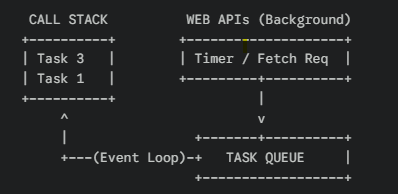
Call Stack: Where your immediate code runs.
Web APIs: Where the browser handles the "waiting" (e.g., waiting 2 seconds for a timer).
Task Queue: Where finished background tasks wait to get back onto the stack.
Key Takeaways
JavaScript is single-threaded
Synchronous = blocking, step-by-step execution
Asynchronous = non-blocking, background execution
Async is essential for:
API calls
Timers
File operations
The Event Loop manages async execution
Avoid blocking code to keep apps responsive
In closing
I hope that you’ve found this blog on “Synchronous vs Asynchronous in JavaScript” helpful...!
That's all for today! 😁 You reached the end of the article 😍.
Want more..?
I write articles on princekumar-engineer.hashnode.dev, and also post development-related content on the following platforms: